
原文链接:https://mp.weixin.qq.com/s/2xcCOc4fw-24BuybMFYiwg
墨水屏日历,采用三色4.2寸墨水屏,展示基本月历信息,支持农历、公共假期、倒计日、天气(实时天气、每日天气)展示。项目以低难度、低成本的方式,方便爱好者实现属于自己的低功耗月历。

1. 硬件方案
该项目为 ESP32 主控的实用嵌入式方案,典型硬件组成如下:
主控芯片:ESP32-WROOM 系列模组(Wi-Fi + Bluetooth 双模)
- 显示部分:适配电子墨水屏 / OLED / LCD 等常见屏模块
- 外设接口:
-
3.3V 供电接口 -
UART 下载 / 调试接口 -
I2C / SPI 外设扩展接口 - 可选配件:RTC 时钟模块、按键、传感器、TF 卡等
- 硬件连接要点:
-
模组 3.3V 供电,严禁直接 5V 供电 -
下载时需拉低 BOOT 键后复位 -
屏幕与传感器按项目默认引脚定义直连即可,无需大量飞线
2. 开发环境一键安装
下载整合好的 Arduino-ESP32 一键安装包
以管理员身份运行安装程序,自动部署:
Arduino IDE
ESP32 开发板驱动
串口驱动(CH340/CP2102)
板级支持包(ESP32 Arduino Core)
安装完成后,直接在 IDE 中选择对应 ESP32 开发板型号
插入硬件,识别串口号后即可直接编译、上传固件
全程无需手动配置路径、无需挂代理下载依赖,新手也可快速完成环境搭建。
如何下载资料

Original link: https://mp.weixin.qq.com/s/2xcCOc4fw-24BuybMFYiwg
The e-ink calendar features a 4.2-inch three-color e-ink display to show basic monthly calendar information, including support for lunar calendars, public holidays, countdowns, and weather (real-time and daily forecasts). This low-difficulty, low-cost project allows enthusiasts to easily build their own low-power calendar.
1. Hardware Solution
This is a practical embedded solution controlled by an ESP32. The typical hardware components are as follows:
Main Control Chip: ESP32-WROOM series module (Wi-Fi + Bluetooth dual mode)
Display: Compatible with common e-ink, OLED, or LCD modules
Peripheral Interfaces:
3.3V power supply interface
UART download/debug interface
I2C/SPI peripheral expansion interface
Optional Accessories: RTC clock module, buttons, sensors, TF card, etc.
Key points for hardware connection:
The module is powered by 3.3V, and direct 5V supply is strictly prohibited.
The BOOT key must be held low during reset for downloading.
Screens and sensors are directly connected according to the project's default pin definitions without requiring excessive wiring.
2. One-Click Development Environment Installation
Download the integrated Arduino-ESP32 one-click installation package.
Run the installer as an administrator to automatically deploy:
Arduino IDE
ESP32 development board drivers
Serial port drivers (CH340/CP2102)
Board support package (ESP32 Arduino Core)
After installation, select the corresponding ESP32 board model in the IDE.
Plug in the hardware, identify the serial port number, and directly compile and upload the firmware.
There is no need to manually configure paths or download dependencies via proxy; even beginners can quickly set up the environment.
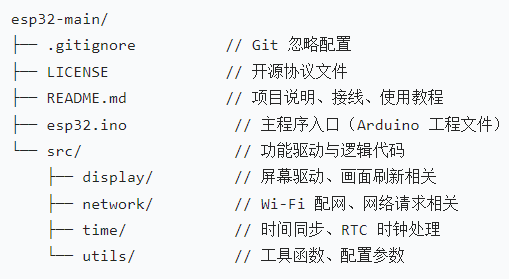
3. File Structure Description
4. Detailed information for this open-source material can be found in the bottom source file link.
How to Download Materials
Follow the Electronic Core public account, and send the corresponding product number in the account — not as a comment on the article!