
最近挖到一个绝佳的 AI 办公搭子 Dumate,处理文档和杂事绝对是提效神器!走我的专属链接,咱俩各领 2000 积分,一起体验准点下班的快乐:https://dumate.cn,我的邀请码是:3V3JPSD
填入邀请码:3V3JPSD,你我都可以得到2000积分。这个积分可以用很久,试过不错。
我是受邀新用户,如何领取奖励?
欢迎加入 DuMate!如果你有搭子分享的邀请码,请按照以下步骤领取你的 500 积分新人福利:
1. 找到兑换入口
登录 DuMate 客户端后,点击推送卡片或左下角【设置】-【邀请有礼】即可进入兑换页面。
2. 填写兑换码
- 在页面的“邀请码兑换”区域,你会看到“输入邀请码”的提示。
- 输入搭子的专属邀请码,点击【立即兑换】。
- 验证成功后,系统会提示“兑换成功,2000积分已到账!”。积分将直接发放到你的账户余额中。你可以在积分消耗明细里查看到这笔名为“邀请有礼 +2000”的奖励。
不用代码、不用配置!百度龙虾 AI 智能体全家桶,让手机 / 电脑 / 家电 “自己动手” 完成复杂任务。这篇超全攻略,帮你找准各产品入口,一步解锁 “实干型 AI”!

先搞懂:5 款产品怎么选?(快速对号入座,部分月底上线请关注)
| 产品名 | 核心场景 | 上手难度 | 适合人群 |
| 手机虾(RedClaw) | 出行、外卖、生活服务 | ⭐️ | 通勤党、懒人族 |
| 桌面虾(DuMate) | 办公自动化、文件处理 | ⭐️⭐️ | 职场白领、运营 / 行政 |
| 云端虾(DuClaw) | 通用跨端、技能定制 | ⭐️ | 所有人、职场人 |
| 家用小龙虾 | 智能家居、家庭服务 | ⭐️ | 全家共享、宝妈 / 长辈 |
| 百度 App 虾 | 临时查询、快速指令 | ⭐️ | 所有人、即用即走 |
一、手机虾(RedClaw):移动端专属 “全能管家”
RedClaw(手机龙虾)是百度智能云自研的产品,属于百度 “龙虾(OpenClaw)” 全家桶的核心移动端产品,和百度深度绑定。
核心关系:RedClaw(原 “红手指 Operator”)是百度智能云团队开发的移动端 AI 智能体应用,是百度 “龙虾” 生态的 “手机虾”,与 OpenClaw(龙虾)深度集成。
- 产品定位:百度在 2026 年 3 月 17 日 AI DAY 上正式发布,是全球首款手机龙虾应用,主打云端虚拟安卓环境、跨 App 自动执行任务。
- 生态归属:属于百度 “龙虾全家桶”(OpenClaw 生态),适配 OpenClaw 的 Skills 能力,可调用百度搜索 Skill 等官方技能。
- 技术与资源:基于百度文心大模型能力,依托百度智能云算力,实现云端 7×24 小时自运行。
- 与你之前安装的 “redclaw-labs” 区别:
- redclaw-labs(GitHub 开源):独立开源 AI 运行时,与百度无关。
- 百度 RedClaw(手机龙虾):百度自研闭源 App,仅在百度生态内发布。
✅ 入口
二、桌面虾(DuMate):办公党效率神器
DuMate(百度桌面虾)是百度自研的桌面端 AI 智能体,定位为 “员工第二大脑 + 执行助理”,主打本地文件处理、跨应用自动化与办公全链路提效。
DuMate 核心介绍
1. 产品定位
- 百度 “龙虾全家桶” 的桌面端核心产品(对应:云端虾 DuClaw、手机虾 RedClaw、家用小龙虾小度龙虾)。
- 本地原生运行,数据优先本地处理,兼顾隐私与效率。
- 深度集成百度文心大模型与 OpenClaw 生态,开箱即用 Skills(搜索、百科、秒哒、Office、浏览器、邮件等)。
2. 核心能力
- 本地文件处理:批量读取 / 转换 / 分析 Word/Excel/PPT/PDF,提取关键信息、生成报表。
- 跨应用自动化:一句话指挥浏览器、Office、邮件、IM 等,自动完成多步骤任务。
- 智能办公助理:合同审核、数据可视化、日程管理、信息汇总,学习用户习惯越用越懂。
- 企业级安全:数据加密、权限管控、合规流转,适配办公场景。
发布时间:2026 年 3 月 17 日官宣,预计 3 月下旬正式上线
✅ 入口
- Windows/macOS:尚未提供(预计首批是windows平台)
- 关注 百度智能云公众号 / 官网、百度 AI 官方微博
- 加入百度 OpenClaw / DuMate 内测 / 公测群
- 企业版:百度智能云控制台→产品→AI 大模型→DuMate(企业部署)
三、云端虾(DuClaw):零部署网页端,随时能用
云端虾(DuClaw) 是百度智能云推出的零部署 OpenClaw 云端 AI 智能体服务,主打 “零门槛、即开即用”,是百度 “龙虾全家桶” 的云端核心入口。
- 全称:DuClaw(百度云端虾)
- 定位:OpenClaw 云端托管版,面向零基础用户的 “零部署养虾” 服务
- 发布时间:2026 年 3 月 11 日(百度智能云)
- 状态:已正式上线,网页端可直接使用
✅ 入口
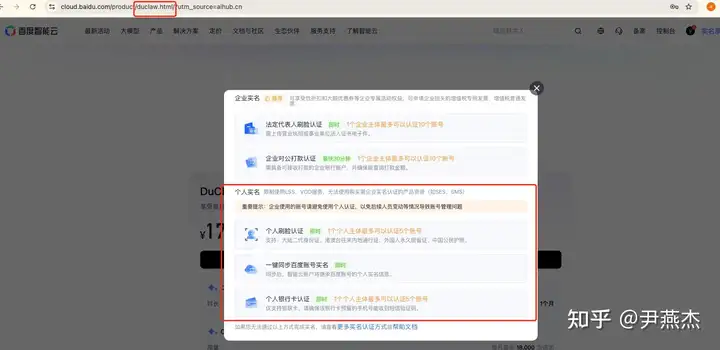
1 分钟上手
✨ 亮点
四、家用小龙虾(小度龙虾):语音唤醒,全家能用
- 全称:小度龙虾(家用小龙虾)
- 定位:家庭场景 OpenClaw 入口,小度智能音箱内置 AI 智能体
- 发布时间:2026 年 3 月 17 日(百度 AIDAY)
- 核心载体:小度智能音箱(全系列支持升级)
✅ 入口
应用案例
小度联动 AI 自动执行,不用动手!✨ 亮点
五、百度 App 虾:无需安装,即用即走
✅ 入口(2 种方式,超方便)
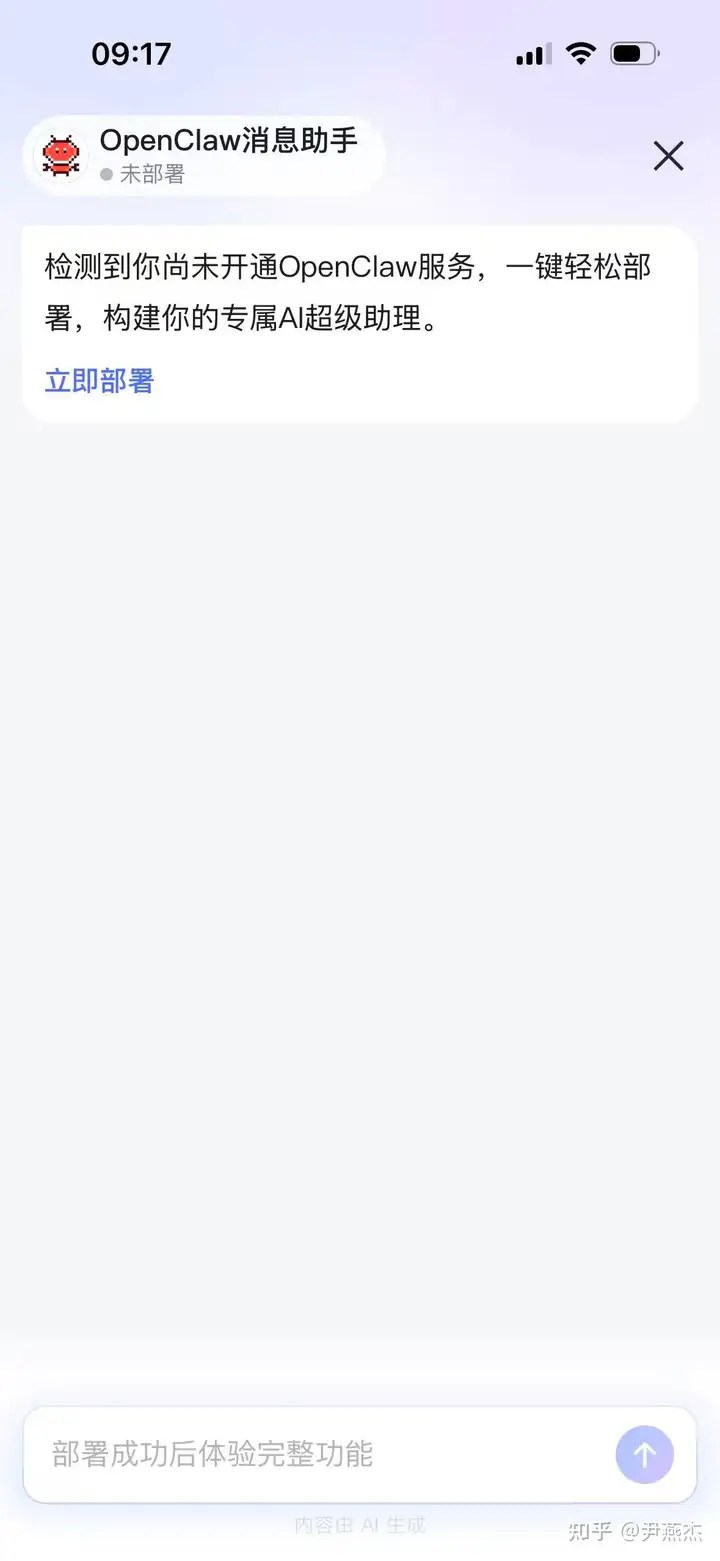
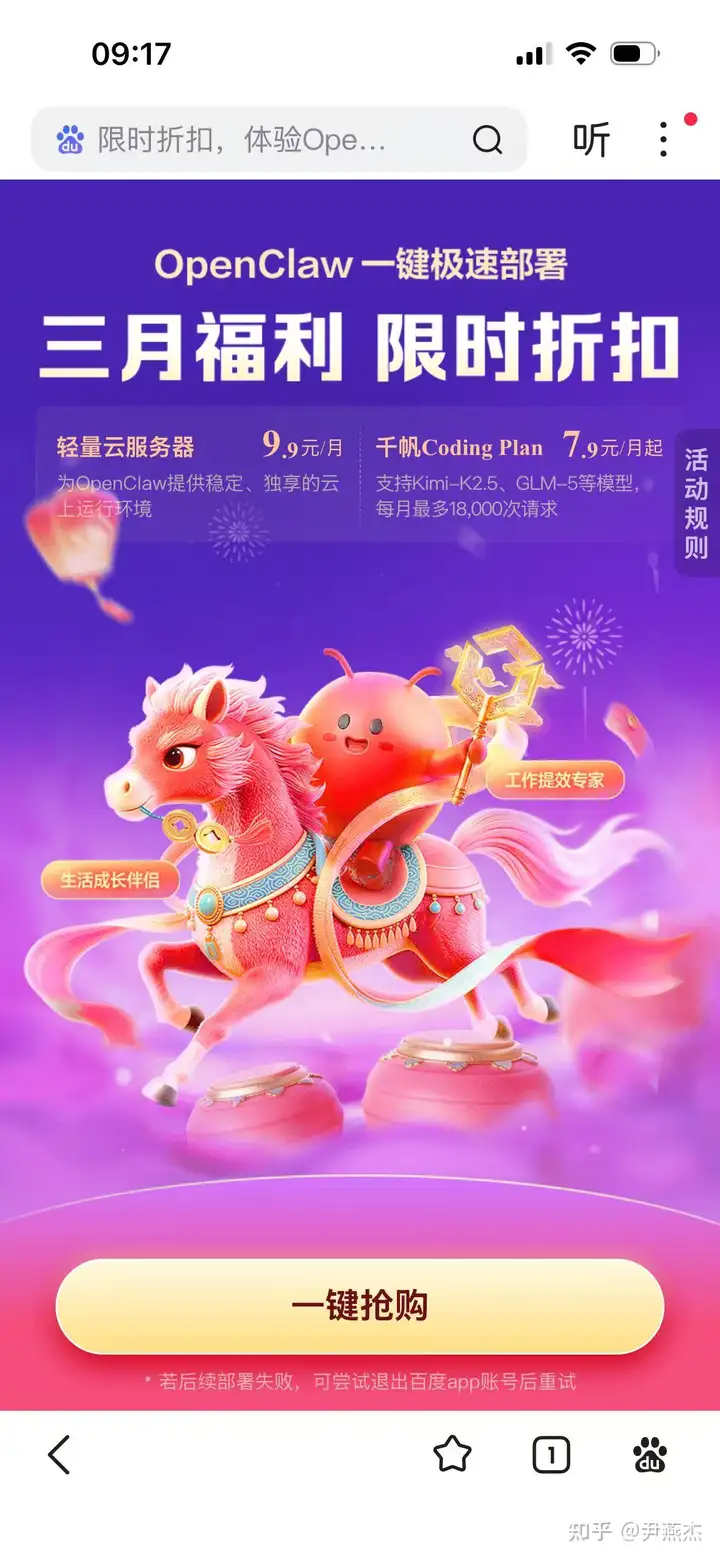
1 分钟上手
✨ 亮点
六、安全保障:全产品通用安全设置
Recently I dug up an excellent AI office buddy, Dumate. It's definitely a productivity booster for handling documents and miscellaneous tasks! Go through my exclusive link, and we'll each get 2,000 credits to experience the joy of leaving work on time together: https://dumate.cn, my invitation code is: 3V3JPSD
Fill in the invitation code: 3V3JPSD, and both of us can get 2,000 credits. This credit can be used for a long time; I've tried it and it's good.
I am an invited new user; how do I claim the reward?
Welcome to DuMate! If you have an invitation code shared by your buddy, follow the steps below to claim your 500 credits new-user benefit:
1. Find the redemption entry
After logging into the DuMate client, click the push card or the bottom-left 【Settings】-【Invitation Rewards】 to enter the redemption page.
2. Fill in the redemption code
On the page, in the "Invitation code redemption" area, you will see the prompt "Enter invitation code".
Enter your buddy's exclusive invitation code and click 【Redeem Now】.
After successful verification, the system will prompt "Redemption successful, 2,000 credits have arrived!". The credits will be directly issued to your account balance. You can see this reward named "Invitation Rewards +2,000" in your credit usage details.
Baidu officially announced that its desktop AI agent DuMate has been fully launched and is now fully open to users. This is China's first domestic enterprise-level OpenClaw (lobster) product, supporting local deployment, designed to enable enterprise users to use it safely and compliantly. DuMate is positioned as an employee's "second brain + executive assistant", with personalized intelligent understanding as the core, deeply integrating user habits and enterprise knowledge systems. The product supports batch processing and mutual conversion of local and cloud multi-format files, intelligent data analysis and processing, and cross-application automation, enabling full-chain office automation. According to IT Home, in response to the current security risk pain points of OpenClaw, DuMate provides a complete solution with multiple layers of protection. On the one hand, DuMate is pre-installed with a security sandbox to isolate it from the local device environment, so code, tasks, and files run in a closed loop without affecting the local environment, spreading risks, or leaking data. On the other hand, for high-risk operations such as file deletion, system modification, and external data transmission, DuMate forces users to explicitly authorize before execution, and also has enterprise-level scenario capabilities such as folder-level permission control and full audit of operations. At the functional level, DuMate natively supports mainstream office software such as Word, Excel, and PPT, has a built-in Baidu Search Skill, has stronger understanding and better task completion rates, and supports users to flexibly expand high-quality Skills on demand.
First, get this straight: How to choose among the 5 products? (Quickly find your match; some will be launched at the end of this month, please stay tuned)
1. Mobile Shrimp (RedClaw): a mobile-exclusive "all-around butler"
RedClaw (Mobile Lobster) is a product independently developed by Baidu Intelligent Cloud and is the core mobile product of Baidu's "OpenClaw" family, deeply bound to Baidu.
Core relationship: RedClaw (formerly "Red Finger Operator") is a mobile AI agent application developed by the Baidu Intelligent Cloud team. It is the "Mobile Shrimp" of Baidu's "OpenClaw" ecosystem and is deeply integrated with OpenClaw (lobster).
Development entity: fully self-developed by the Baidu Intelligent Cloud team; it is not a third-party open-source project.
Product positioning: Baidu officially released it at AI DAY on March 17, 2026. It is the world's first mobile lobster application, featuring a cloud-based virtual Android environment and automatic cross-app task execution.
Ecosystem affiliation: it belongs to Baidu's "lobster family bucket" (OpenClaw ecosystem), is compatible with OpenClaw's Skills capabilities, and can call official skills such as Baidu Search Skill.
Technology and resources: based on Baidu ERNIE large model capabilities and Baidu Intelligent Cloud computing power, it can run autonomously in the cloud 7×24 hours.
Differences from the "redclaw-labs" you previously installed:
redclaw-labs (open source on GitHub): an independent open-source AI runtime, unrelated to Baidu.
Baidu RedClaw (Mobile Lobster): Baidu's self-developed closed-source app, released only within Baidu's ecosystem.
✅ Entry
Android: Search for "RedClaw" or "Red Finger Operator" directly in the app store to download (unverified)
iOS: expected to launch at the end of March 2026. RedClaw download page (not accessible yet as of publication)
2. Desktop Shrimp (DuMate): an efficiency tool for office workers
DuMate (Baidu Desktop Shrimp) is Baidu's self-developed desktop AI agent, positioned as an "employee's second brain + executive assistant", focusing on local file processing, cross-application automation, and full-chain office efficiency improvement.
DuMate core introduction
1. Product positioning
Baidu's "Lobster Family Bucket" desktop-side core product (corresponding to: Cloud Lobster DuClaw, Mobile Lobster RedClaw, Home Lobster Xiaodu Lobster).
Local native operation, data prioritized processing locally, balancing privacy and efficiency.
Deeply integrated with Baidu Wenxin model and OpenClaw ecosystem, ready-to-use Skills (search, encyclopedia, Miaoda, Office, browser, email, etc.).
2. Core Capabilities
Local file handling: Batch read/convert/analyze Word/Excel/PPT/PDF, extract key information, generate reports.
Cross-application automation: One-sentence command for browser, Office, email, IM, etc., to automatically complete multi-step tasks.
Intelligent office assistant: Contract review, data visualization, schedule management, information consolidation, learns user habits and gets smarter with use.
Enterprise-level security: Data encryption, permission control, compliant handling, adapted to office scenarios.
Release time: Announced on March 17, 2026, expected to officially launch in late March.
✅ Entry
Windows/macOS: Not yet provided (expected to be on Windows platform first).
Follow Baidu Intelligent Cloud public account/official website, Baidu AI official Weibo.
Join Baidu OpenClaw/DuMate beta/public test group.
Enterprise version: Baidu Intelligent Cloud Console → Products → AI Large Model → DuMate (enterprise deployment).
3. Cloud Lobster (DuClaw): Zero-deployment web version, usable anytime.
Cloud Lobster (DuClaw) is a zero-deployment OpenClaw cloud AI agent service launched by Baidu Intelligent Cloud, emphasizing "no threshold, instant use", and is the cloud-side core entry point for Baidu's "Lobster Family Bucket".
Full name: DuClaw (Baidu Cloud Lobster)
Positioning: OpenClaw cloud-hosted version, for users with zero background for "zero-deployment lobster keeping" service.
Release time: March 11, 2026 (Baidu Intelligent Cloud)
Status: Officially online, web-side directly usable.
✅ Entry
Direct link: DuClaw official website, under Baidu Intelligent Cloud, safe and reliable.
https://cloud.baidu.com/product/duclaw
Alternative path: Baidu Intelligent Cloud Console → Products → AI Large Model → DuClaw
1-minute quick start
Open the web page, log in with Baidu account (registration takes 10 seconds if no account).
Click "One-click adopt", zero configuration, zero deployment, automatic activation.
Send commands in the chat box, example:
"Check tomorrow's Beijing weather + morning rush hour traffic + book 8 am high-speed rail ticket"
"Sync Feishu calendar to DingTalk, remind me of the 2 PM meeting tomorrow."
✨ Highlight
Built-in Baidu search core skill, ultra-accurate information retrieval.
Skills Marketplace allows for plug-in installation to extend functionality on demand.
IV. Home Crayfish (Xiaodu Crayfish): Voice-activated, family-friendly
Xiaodu Crayfish (Home Crayfish) is the family-friendly version of OpenClaw, launched by Baidu on March 17, 2026, during AIDAY. It integrates the "Crayfish AI" into Xiaodu speakers, focusing on voice activation, shared family access, and completing tasks in one go, serving as the "super housekeeper" for households.
Full name: Xiaodu Crayfish (Home Crayfish)
Positioning: The entry point for OpenClaw in home scenarios, embedded in Xiaodu smart speakers.
Release date: March 17, 2026 (Baidu AIDAY)
Core carrier: Xiaodu smart speakers (upgradeable across the entire line)
✅ Access
If you have a Xiaodu device (speaker/smart screen): It's ready to use, already built-in.
Xiaodu App: Open the app to activate, no additional download required.
Use case
Ensure the Xiaodu device is connected to the internet and logged into a Baidu account.
Voice command: Say "Xiaodu Xiaodu, ask Crayfish to..." followed by your instruction. Examples:
"Turn on the living room lights + check if it will rain tomorrow + book a cleaning service for the day after."
"Order a McDonald's family-size meal, deliver it to my home."
✨ Highlights
Easy for elders and children to use, direct voice access.
One-stop integration of smart home and lifestyle services.
V. Baidu App Crayfish: No installation needed, use it anytime
✅ Access points (2 ways, very convenient)
Open the Baidu App → enter "@OpenClaw" in the search bar to instantly activate it.
Baidu App → Messages → find the "OpenClaw Assistant" and pin it for immediate use.
1-minute setup
Once activated, no login is required (it's already linked to your Baidu account).
Send instructions directly. Examples:
"Check high-speed train tickets from Beijing to Shanghai, filter for departure times later than 3 PM, and capture a screenshot."
"Compile 5 trending news items for today and generate summaries."
✨ Highlight
"Zero installation, zero configuration — perfect for temporary use."
"Powered by Baidu search, providing instant responses for query-based tasks."
Section 6: Security Assurance — Universal product safety settings
"All products’ security control entry: Settings → Security & Permissions."
"Cloud: DuClaw Console → Security Center."
"Core protection: Permission control (only authorized apps/files), data encryption (local + cloud), and operation auditing (traceable AI actions)."
核心保障:
Permission control: Authorized access only to necessary apps/files, closable anytime.
Data encryption: Local + cloud data fully encrypted, no leakage.
Operation audit: All AI actions traceable, ensuring safe usage.