

大家好,我是德服Ma。
前段时间入手了两台墨水屏——Tolino Vision 6和Kobo Forma,前者是7寸的,而后者是8寸的。正常拿着看书、或者放在支架上都没问题,但是躺在床上用时,会有些不太方便,不如6寸的舒服。
我手头还有两个6寸的,一个是Kindle Voyage,背光有比较明显的阴阳屏;另一个是Kobo Glo HD,采用的红外屏,底色很白,静态显示很棒,但它是比较早的产品,背光一般,而且翻页后字会有些发虚,后面考虑出掉了。
总之,两台都不太满足我的需求。
在刷咸鱼的时候,我盯上了Kobo Clara 2e,之所以不选Kobo BW,当然还是太贵了。看网上评论说:Kobo Clara 2e背光不错,并且是Carta 1200的屏幕,字体会更黑一些。
不过,这个型号的卖家很少,而且价格普遍偏贵,基本都在500-600。后来,我遇到了Kobo Clara 2e的安卓版——Tolino Shine 4,价格便宜一百多,于是便入手了。
Tolino Shine 4于2022年10月发布,由Rakuten Kobo代工,硬件基础和Kobo Clara 2e相似。采用6英寸 Carta 1200、300 PPI的屏幕,16级灰度;处理器是AllWinner B300(比较耗电),配置是1 + 16 G,USB-C的接口。
它的重量约为170克,整体外壳都是再生塑料,正面黑色,背面深蓝色,手感还不错。还有IPX8的防水。屏幕是凹屏,没有纯平结构的玻璃盖板,显示会更清晰。
系统方面,Tolino是基于Android 8.1开发的系统,所以可以直接安装第三方APP,而不用越狱啥的。
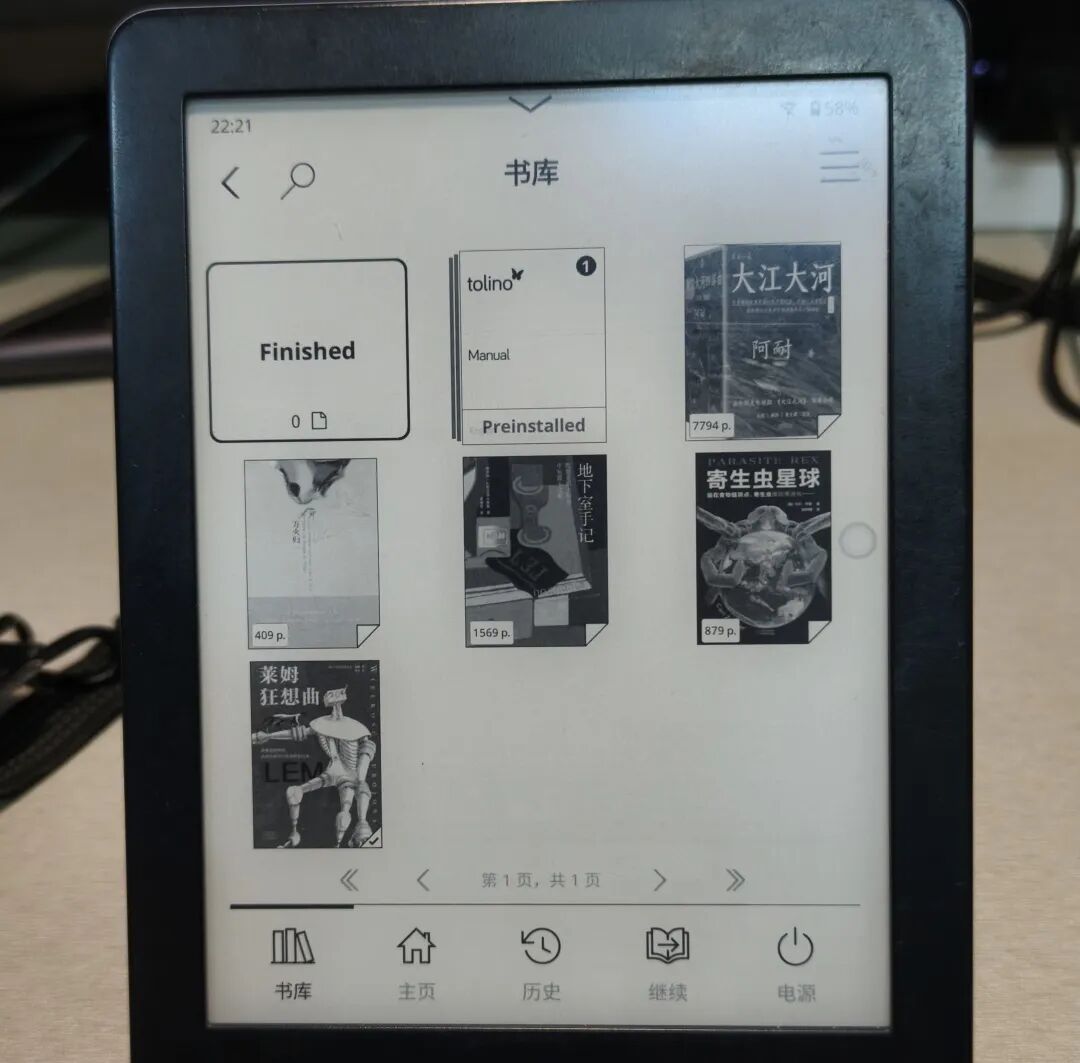
到手之后,我怀疑卖家应该没用过这个机器,因为系统语言是德语,也没有中文书籍。于是,我便连上电脑,导入了几个喜欢的字体和一本正在看的《莱姆狂想曲》。
打开书后,显示的都是乱码,我尝试着更换了导入的中文字体,发现都可以正常使用,而不像另一台Tolino Vision 6那样不能用,这就很奇怪了。
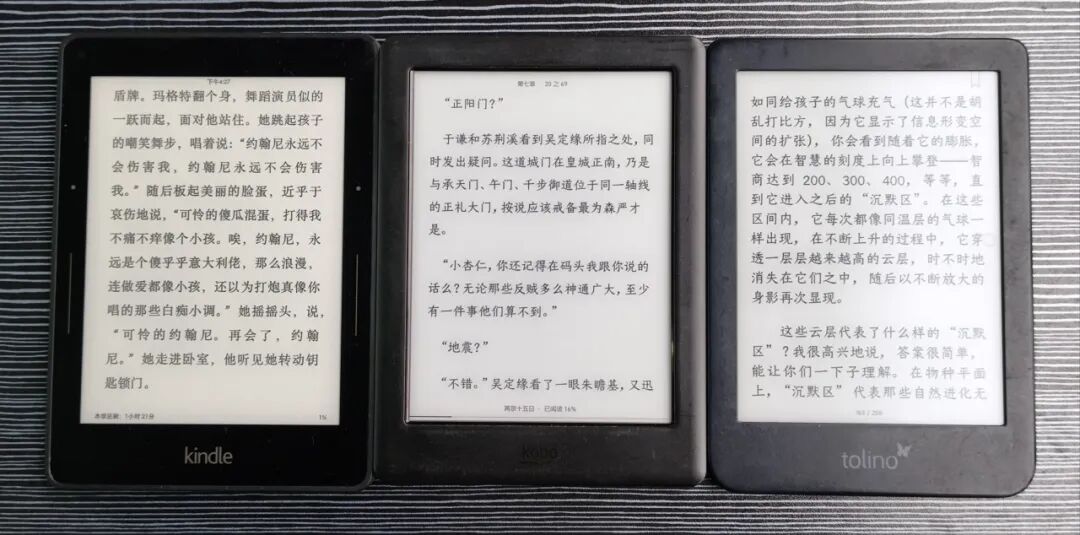
但是,我也没有想太多,可能是固件版本不同?(后面我把TV6重置了,发现也可以更换中文字体,挺不错的)
之后,我开始安装第三方APP,还是经常用的那几款:E-ink launcher、KOReader、微信读书和M手势。具体方法如下:
1. 将机器连接电脑,把下载好的apk文件放到根目录下,之后断开连接;
2. 在搜索框输入“112358132fb”,点击搜索,进入debug模式;
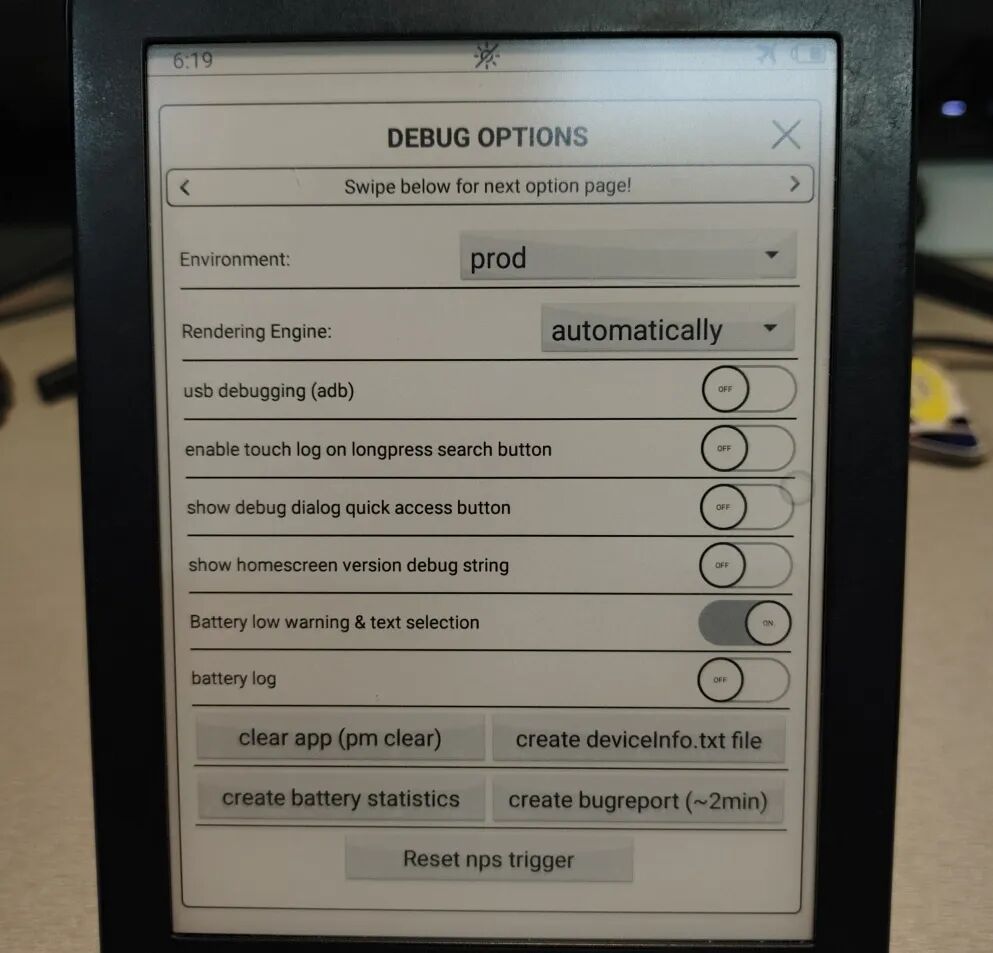
3. 点击上面的箭头,翻到第二页,可以看到Install APK,直接点击“install”,它会提示安装失败,不用管它,其实已经安装成功了;
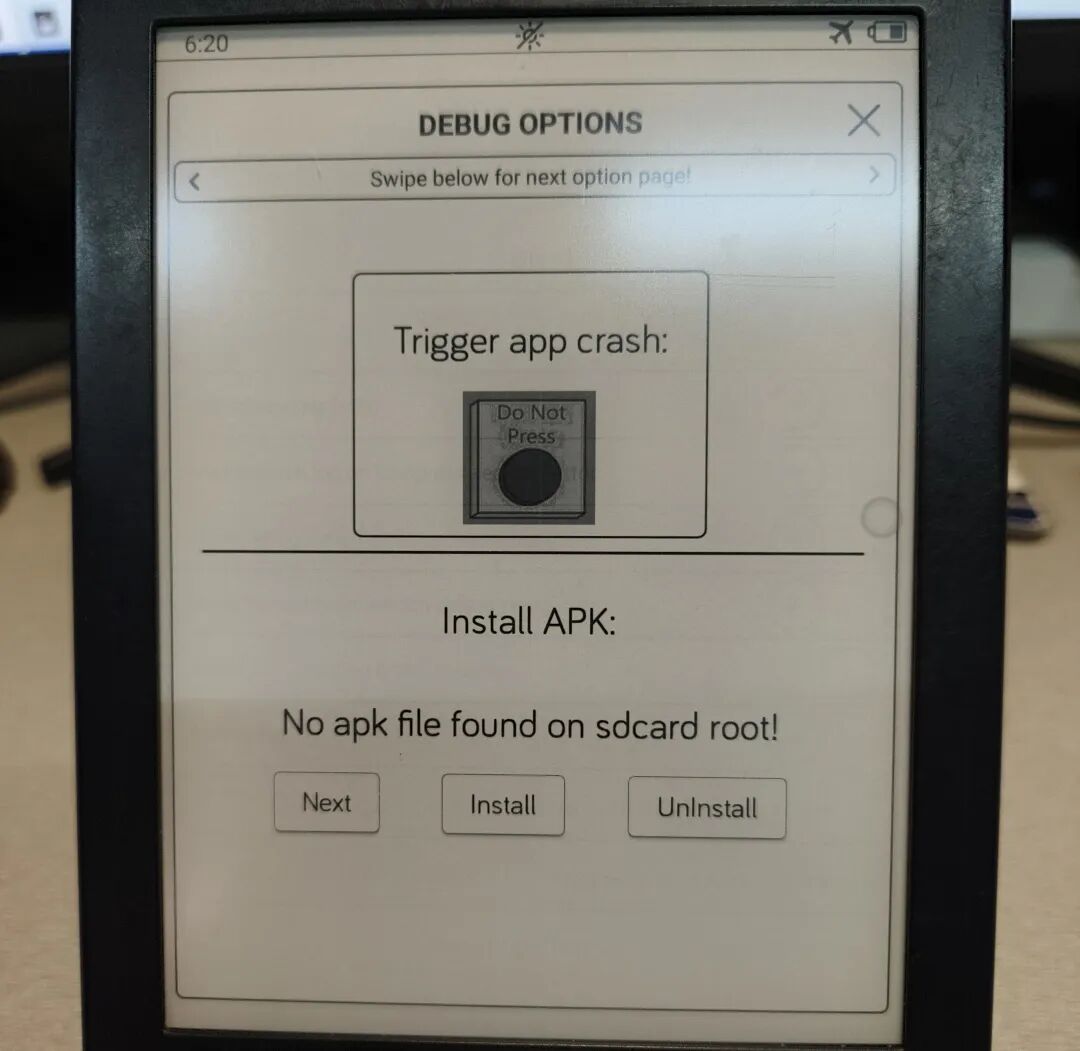
4. 安装好一个之后,点击“Next”,继续安装下一个APP,直到安装完;
5. 最后重启机器,选择你安装的桌面,就完成了。
是不是非常简单!
显示方面,300 PPI的屏幕,显示肯定是没啥问题的。不过,在原系统中,排版调节十分简陋,和Kindle差不多,不过Kindle可以调字体的粗细。
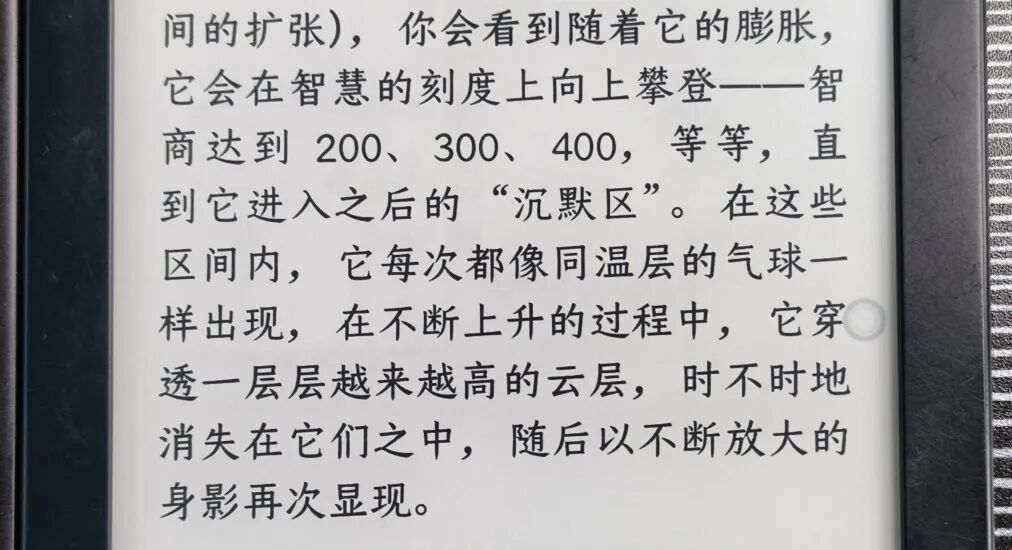
如果使用宋体、霞雾文楷这种线条比较细的字体,我个人感觉观感上没有加粗后的效果好。
最近,我发现了一个很不错的字体——苍耳今楷04 - W04,它的线条更粗一些,肉眼会感觉对比度更高,更舒服。

不过,用KOReader的话,这些都不是问题。此外,KOReader的开放程度非常高,可以通过各种补丁来美化界面、增强功能,小红薯上有不少教程。我安装了一个比较好操作的插件——SimpleUI,界面功能更加可视化。
此外,Tolino Shine 4的残影控制还是挺不错的,翻页之后字体也不会出现发虚的情况,翻页速度也很快(在KOReader中,原系统下,快速翻页有时会卡顿一下)。
背光还算均匀。不知道是角度问题,还是错觉,躺着看会感觉屏幕上方稍微发红,底部两角会更亮一些;坐着看又觉得挺均匀的。
不足之处,Tolino Shine 4的续航很一般。只算阅读时间的话,估计在10小时左右,待机耗电不高。正常使用,充满电可以撑3-4天。不过,它充电挺快的,也算弥补了续航拉的问题。
写在最后
总而言之,作为一个便携的6寸阅读器,Tolino Shine 4还是挺合格的:重量轻、显示好,还可以安装第三方APP;缺点就是有续航焦虑。
目前,它在咸鱼上的价格普遍比Kobo Clara 2e低,可以蹲到好价,性价比更高。
Hello everyone, I'm Ma from the German division.
Recently, I acquired two e-ink screens — the Tolino Vision 6 and the Kobo Forma. The former is 7 inches, while the latter is 8 inches. They are fine for reading while sitting or on a stand, but lying in bed, they are not as convenient as a 6-inch device.
I also have two 6-inch devices: a Kindle Voyage with noticeable backlight shading, and a Kobo Glo HD with an infrared screen that has a very white background and excellent static display, but it's an older model with poor backlight and text blurring after page turns — eventually, I decided to sell it.
In short, neither of them fully met my needs.
While browsing Xianyu, I found the Kobo Clara 2e — I didn't choose Kobo BW because it was too expensive. Online reviews say the Clara 2e has good backlight and a Carta 1200 screen that makes text darker.
However, sellers of this model are rare, and prices are generally high — mostly 500–600 yuan. Later, I discovered the Android version of Kobo Clara 2e — Tolino Shine 4 — which is 100+ yuan cheaper, so I bought it.
The Tolino Shine 4 was released in October 2022, manufactured by Rakuten Kobo, with similar hardware to the Kobo Clara 2e. It features a 6-inch Carta 1200, 300 PPI screen with 16 grayscale levels; an AllWinner B300 processor (which consumes more power); 1+16 GB configuration; and USB-C interface.
Weighing ~170 grams, its shell is entirely recycled plastic — black front and dark blue back — with a pleasant texture. The IPX8 waterproof rating is present. The screen is recessed without a flat glass cover, making display clearer.
The system is based on Android 8.1, allowing direct installation of third-party apps without jailbreaking — a major advantage.
Upon arrival, I suspected the seller had never used the device — the system language was German, and no Chinese books were present. I connected it to my computer, imported several favorite fonts and the novel “Rhythm of Limes” that I was reading.
Initially, everything displayed as gibberish, but after trying different imported fonts, they all worked fine — unlike the Tolino Vision 6, which rejected some fonts. This was odd, but I didn’t overthink it — perhaps due to firmware version differences? (Later, resetting TV6 revealed it too could accept Chinese fonts — nice.)
Next, I installed third-party apps: E-ink Launcher, KOReader, WeChat Reading, and M-gesture — using the same method:
1. Connect device to computer, copy .apk files to root directory, then disconnect.
2. In search box, enter “112358132fb” and click search to enter debug mode.
3. Click upward arrow to page 2, find “Install APK”, click “install” — even if it says failure, the app is actually installed.
5. Reboot device, select your installed launcher — done! Simple and effective.
Fine fonts like Songti or Xiawu Wenkai look better with slight boldness, improving contrast and legibility.
I recently discovered a great font: Cang’er Jin Kai 04-W04 — its thicker strokes enhance visibility without sacrificing clarity.
With KOReader, these issues disappear — it’s highly customizable via patches and plugins. On Xiaohongshu, there are tutorials — I installed SimpleUI, which simplifies the interface.
Residual image control is good — no significant blurring after page turns. Page-turning speed is fast (in native app, sometimes slow), and backlight is reasonably even — though lying down, I perceived slight redness above and brighter corners below — possibly an optical illusion.
The main con is battery life — ~10 hours of reading time, ~3–4 days total use. But it charges quickly, mitigating the short runtime.
However, with KOReader, none of this is an issue. Furthermore, KOReader is highly customizable, allowing for interface beautification and functional enhancements via various patches — there are plenty of tutorials available on Xiaohongshu. I installed a particularly user-friendly plugin called SimpleUI, which makes the interface and features much more visually intuitive.
Additionally, the Tolino Shine 4’s ghosting control is quite impressive; the font remains sharp and clear after page turns, and the flipping speed is fast (though in the stock system, rapid flipping can sometimes cause slight stuttering).
The backlighting is reasonably uniform. Whether due to viewing angle or optical illusion, I sometimes notice a slight red tint at the top of the screen while lying down, and slightly brighter corners at the bottom. When sitting upright, the lighting appears more uniform.
A notable drawback is the limited battery life of the Tolino Shine 4. Counting only active reading time, it likely lasts about 10 hours, with low standby drain. Under normal use, a full charge sustains about 3–4 days. On the bright side, it charges relatively quickly, partially compensating for the short runtime.
写在最后
Overall, as a portable 6-inch e-reader, the Tolino Shine 4 performs competently: lightweight, excellent display, and supports third-party apps. The primary concern remains battery anxiety.
Currently, its price on Xianyu is typically lower than the Kobo Clara 2e, making it a more cost-effective option if you’re willing to hunt for deals.