
之前写过一篇墨水屏设备便利贴的分享,本以为这只是小众玩家的玩具,没想到深入了解后才发现:墨水屏圈子早已暗流涌动。
无数技术大神已经开启DIY 模式,尤其是 B 站大佬,直接扒开源码吃透,还把完整工程开源免费放出,所有人都能拿来用。

只要你有一丢丢动手能力,理论上就能亲手组装出任意形态的墨水屏设备:把工作进度、每日目标、待办清单统统搬上屏幕,纸质笔记、手写计划一键数字化,可玩性直接拉满!
而让这一切彻底封神的,是这套开源 AI 墨水屏系统 ——InkSight。
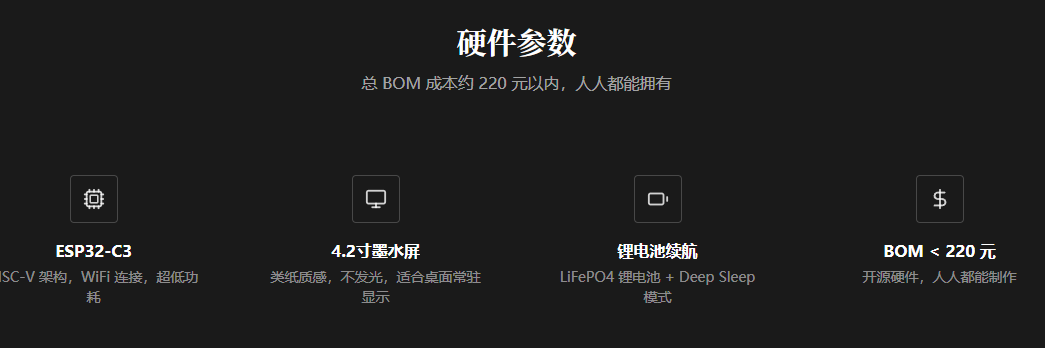
它彻底打破传统 OCR 局限,不是简单识别文字,而是把手写照片转化为可编辑、可搜索的数字墨迹,堪称墨水屏生态的「终极外挂」。
折腾地址:https://github.com/datascale-ai/inksight
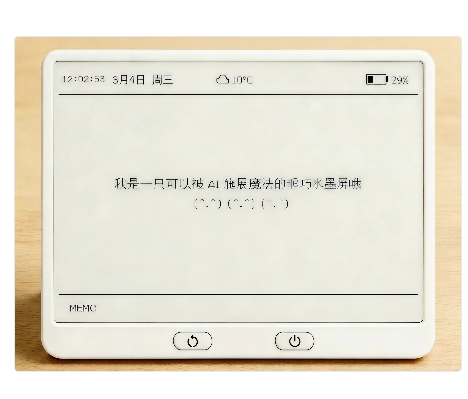
它到底是 “赛博废物”,还是真神器?
对快节奏的当下,这台设备能实现:离线 ↔ 在线自由切换,纸质手写秒变数字笔迹。
随手拍一张纸质笔记、手写信件,就能转换成 SVG 数字墨水,完整保留每一笔的书写形态,不是生硬的文字识别,而是真正还原手写的 “灵魂”,同时拥有墨水屏独有的专注感与护眼体验。
简单说:你能想到的任何内容,都能在这块墨水屏上输出。
更香的是:
-
完全开源免费 -
模型、数据集、完整代码全部开放 -
支持本地部署 + 在线体验 -
不用花钱、无门槛 -
开发者 & 普通玩家都能自由二次开发 -
适配几乎所有常见墨水屏设备
随便想到了三个实用场景
-
阅读场景:电子书、阅读器、便携墨水屏,墨水屏最稳的基本盘,护眼无蓝光。
-
显示场景:墨水屏电子相框、桌面摆件、墙面装饰屏,展示照片、壁纸、氛围图。
-
实用助手场景:日历、天气、倒计时、课程表、学习计划、待办清单。手写录入 → 同步上屏 → 实时看进度,清晰不刺眼。
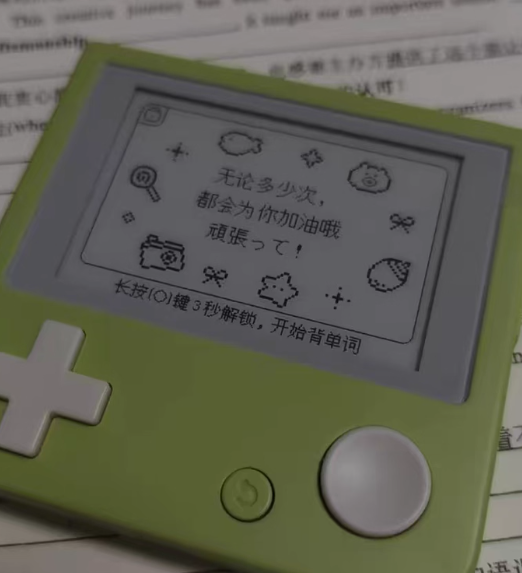
我认为随着技术的发展,这些代码就是修仙小说里面的元婴大佬夺舍,可以夺舍万物墨水屏: “夺舍”个百词斩设备还不是手拿把掐的吗?
想一想这些:百词斩单词机、阅星曈、各种电子单词卡、便携阅读器……这些封闭设备,全部被开源 InkSight 夺舍。变成人人都能 DIY、自由改、随便刷的 “完全体”,真正属于自己的智能墨水屏终端。
I once wrote a piece sharing a memo device with an ink screen, thinking this was just a toy for niche players. Little did I expect that after delving deeper, I'd discover that the ink screen community was already full of hidden currents.
Countless tech gurus have already kicked off DIY mode, especially the B station bigwigs who dove right into the source code and figured it out. They even went ahead and released a complete, open-source project for free so everyone can use it.
As long as you have a hint of manual dexterity, theoretically speaking, you can assemble any shape of ink screen device with your own hands. You can move work progress, daily goals, and to-do lists right onto the screen. You can digitize paper notes and handwritten plans with a single click, shooting the playability value through the roof!
What elevates this to a legendary level is this open-source AI ink screen system — InkSight.
It completely breaks through the limitations of traditional OCR, not just recognizing text but transforming handwritten photos into editable, searchable digital traces. It's truly the ultimate cheat code for the ink screen ecosystem.
Tinkering address: https://github.com/datascale-ai/inksight
What is it? Is it "cyber trash," or is it a true artifact?
For the fast-paced present day, this device makes it possible to switch freely between offline and online modes, turning paper handwriting into digital ink in an instant.
Just snap a photo of your paper notes or handwritten letter, and it converts to an SVG digital format, perfectly preserving the shape of every stroke. It isn't rigid text recognition — it's a genuine restoration of the soul of handwriting, combined with the unique focus and eye-friendly experience of an ink screen.
To put it simply: anything you can think of can be output on this ink screen.
What's even sweeter is:
It's completely open-source and free.
The model, dataset, and full code are all open.
It supports both local deployment and online experience.
There's no need to spend money, and there isn't a barrier to entry.
Developers and ordinary players can both freely customize and develop it further.
It's compatible with almost all common ink screen devices.
A couple of practical scenarios immediately come to mind:
Reading: e-books, readers, portable ink screens — the most stable foundation of ink screens, with eye-protection and no blue light.
Display: ink screen digital photo frames, desktop ornaments, wall decorations — showing photos, wallpapers, and ambient images.
Practical assistant: calendars, weather, countdowns, timetables, study plans, and to-do lists. Write it down → synchronize to the screen → see real-time progress, clearly and without glare.
I believe that with the development of technology, this code is like the reincarnation of a Nascent Soul cultivator in a Xianxia novel. It can possess any ink screen device. Isn't it easy to possess a Baicizhan device?
Think about this: Baicizhan word machines, Yueshingdong, various electronic flashcards, and portable readers — these closed devices will all be possessed by the open-source InkSight. They will become fully customizable, freely modified, and easily brushed-up "complete bodies" — true smart ink screen terminals that belong to the individual.